SEO checklist: 280 checks in the order that pays
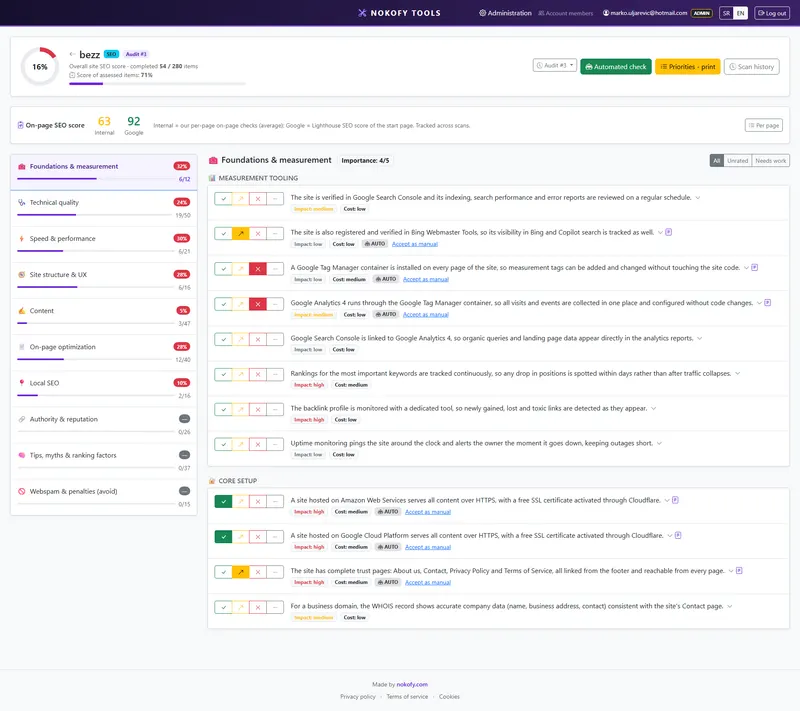
You know something's wrong. You don't know what comes first. Instead of ten pieces of advice from the internet that contradict each other, you get 280 concrete checks sorted into areas. Once you score them, the tool builds an order of fixes — starting with what returns most and costs least.
0
checks in this checklist
across 10 areas · every item explains why it matters and how to fix it
What it covers
The items are split into areas. The number beside each says how many checks it carries.
Why a checklist rather than general advice
You open ten SEO articles and get ten different answers. One says meta descriptions are dead, another that they’re decisive. A third talks about speed, a fourth about backlinks. All are partly right, and you still don’t know what to do on Monday morning.
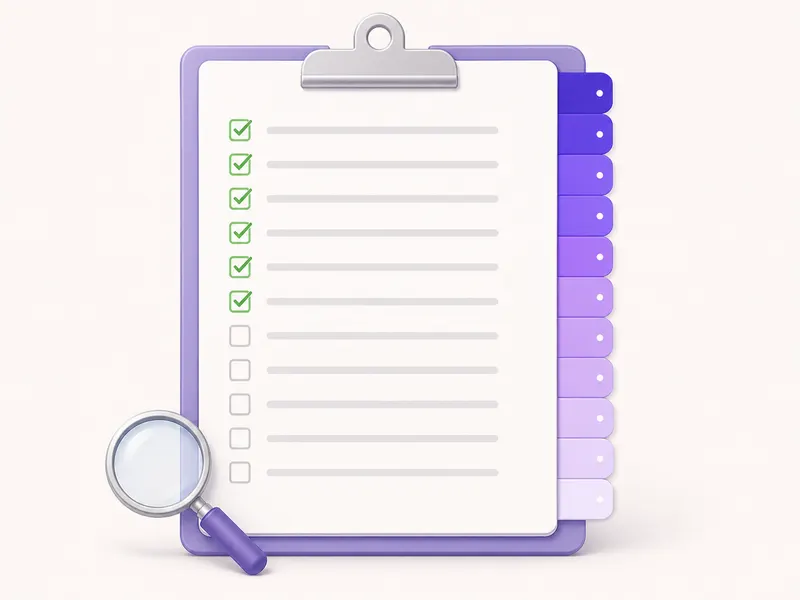
The problem isn’t a shortage of information. The problem is that you don’t have a list.
A checklist solves exactly that. It doesn’t ask you to understand SEO — it asks you to answer 280 concrete questions about your own site. Do the pages have unique titles? Does the site open without www as well? Is there text answering the questions customers ask before buying? You can answer every one of those, even if you’ve never read a word about SEO.
The items are split into ten areas, from technical foundations to reputation. Not one of them is there because „that’s how it’s done“ — each carries an explanation of what specifically you lose by skipping it.
What one item looks like
Every item on the list has five parts:
- The check itself — one sentence, no jargon. For example: the page title tag is unique and shorter than 60 characters.
- Why it matters — what happens when it isn’t so. This states the concrete consequence, not theory.
- How to fix it — the steps to take. Where in your site admin to click, what to change.
- Impact rating (1–3) — how much this one item changes the result. A three means it shows in the positions, a one means it’s fine polish.
- Estimated cost of the fix (1–3) — what it costs you in time or money. A one is ten minutes, a three is a job for a developer.
Alongside comes a list of recommended tools, clearly marked as free or paid. We don’t send you off to go looking.
You score with four buttons: Good, Could be better, Bad and Not applicable. The last is excluded from the score — if you don’t have a shop, basket items don’t drag your result down.
The repair plan
This is the part the checklist exists for.
Everything you scored „Bad“ or „Could be better“ enters the repair plan. The tool doesn’t show it alphabetically or in the order you filled it in, but sorted by the formula (impact + cheapness) × urgency. Translated: first comes what returns a lot, costs little and can’t wait.
The result is a list from first item to last. You don’t have to decide what’s more pressing — that’s already decided.
The plan exports to PDF and to CSV. The PDF goes to a client or a boss, the CSV goes into Trello, Jira or a spreadsheet — however you run your tasks.
What the tool scores instead of you
The automatic check covers around 150 checks and fills in part of the scores by itself.

It works by taking a sample of pages by type: up to eight products, four categories, two text pages, the basket and the homepage. It doesn’t walk the whole site — it walks a cross-section that says enough about the whole. It takes two to five minutes.
Two rules matter. First: the automatic check never touches manual scores. If you’ve already scored something yourself, it stays as you said. Second: everything the tool fills in is marked as filled automatically. When you check it and agree, you click „accept as manual“ and the score becomes yours.
So in five minutes more than half the checklist is filled in, and what remains are the things only you have the answer to.
A real example
A bicycle equipment shop, around 400 products. The owner is sure he needs „more links“.
The automatic check finishes in three minutes and fills in 148 items. Result: 62 good, 51 could be better, 35 bad. He fills in the rest by hand in an hour.
The repair plan puts three things at the top, none of them about links:
- Every category page shares the same description — impact 3, cost 1.
- The site opens both with www and without, as two different sites — impact 3, cost 1.
- Product images are at full resolution, the average page weighs 6 MB — impact 3, cost 2.
The first two were solved in one afternoon. The third took three days. Links appear on the list only in fourteenth place.
Honestly: a checklist won’t bring you positions by itself — it tells you what to do, and the work is still yours. And no tool, ours or anyone else’s, knows with certainty how Google ranks. The area „Advice, myths and ranking factors“ exists for exactly that reason: to separate what has been verified from what gets repeated.
Frequently asked questions
Do I have to go through all 280 items at once?
No. The checklist remembers where you stopped. Most people do one area a day and have the full picture in two weeks. If you're in a hurry, start with „Foundations and measurement“ and „Technical site quality“ — that's where the things that hold a whole site back usually sit.
What if an item has nothing to do with my site?
You mark it „Not applicable“ and it leaves the calculation. If you don't have a shop, items about products don't drag your result down. The score counts only what genuinely applies to you.
How many items does the tool score by itself?
The automatic check covers around 150 — everything that can be read from the page code, the response headers and the site structure. The rest are things only you have the answer to: whether the text is accurate, whether the image shows the right product, whether your price is competitive.
Can I run the checklist for several sites?
On the free plan you get one personal checklist per type. Pro and Business get projects per client — each client their own audit, several audits over time, and history so you can see what improved.
What do I get at the end?
A repair plan sorted by priority, with an estimate of impact and cost for every item. It exports to PDF (for a client or a boss) and CSV (for your task system).
The other checklists
Ecommerce checklist
461 checks
461 checks across 15 areas — from first impression and search to basket, checkout and what happens after the purchase.
AI visibility (AEO and GEO)
56 checks
56 checks across 7 areas — how to make your site the source an AI pulls its answer from, rather than a page it skips.
Local SEO
111 checks
111 checks across 8 areas — business profile, local content, directories, reviews and tracking results.
Put your site through 280 checks
Create an account, run the automatic check, and in five minutes you'll see the first ten things to fix. The free plan asks for no card.
No card · No contract · Cancel anytime