Keyword research with proof the words are worth it
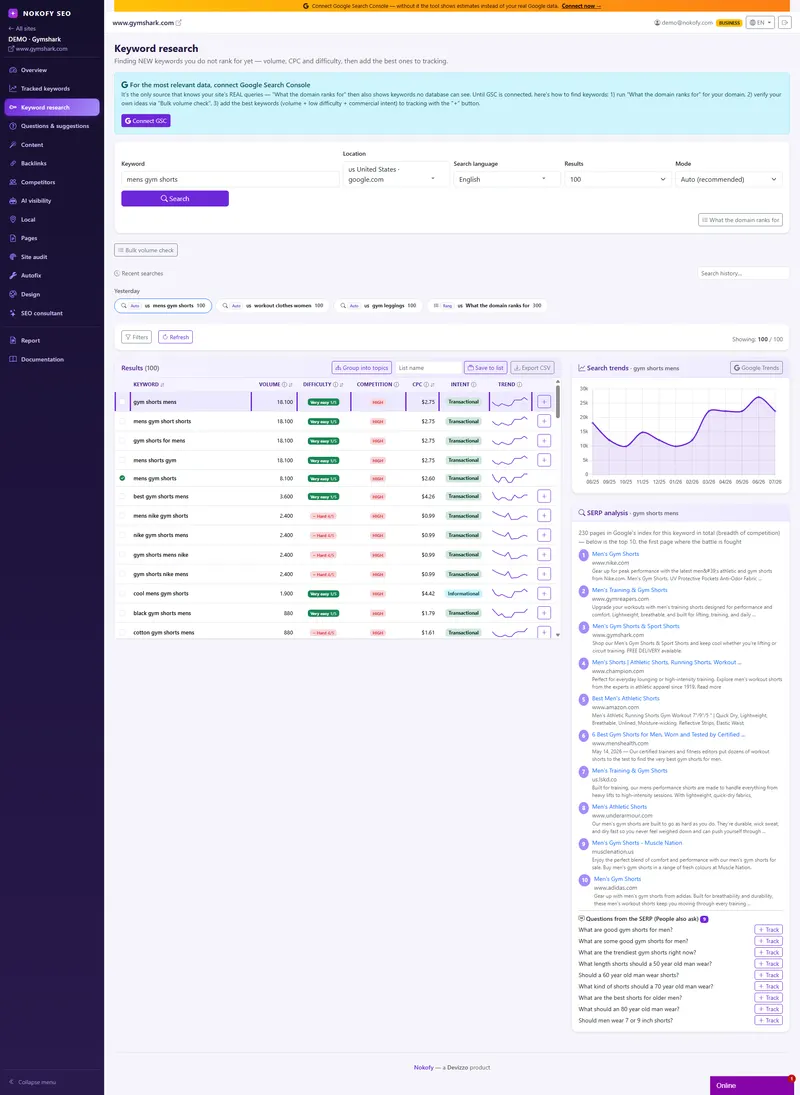
Keywords you don't rank for yet — and proof they're worth it. Here you're not looking at where you are but where you could be: how much a keyword is searched, how hard it is to rank for, how much advertisers pay per click, and with what intent people type it. And then the most useful part — who is already buying ads on it.
- 1000
- keywords in one bulk check
- 4
- ways to search: Auto, Related, Suggestions, Ideas
- 100+
- cached keywords when you reopen old research
The problem: you’re fighting for the keyword everybody wants
Almost everyone thinks first of the most obvious word in their business. The lawyer wants to be first for „lawyer Belgrade“, the shop for „air conditioners“, the clinic for „dentist“. Those are the words everybody fights over, against sites that have been there ten years and ad budgets you don’t have. You invest half a year, don’t move, and conclude that SEO doesn’t work.
Meanwhile, next to that one word sit hundreds of others nobody in your industry has even looked at. They’re longer, more specific, searched fewer times — but typed by someone who knows exactly what they want and is ready to buy. You don’t need ten years to win those; you need one good text.
The problem is that you can’t see them, because you don’t talk like your customer — you use trade words, they use their own. So keyword research is really a translation job, from the language of the trade into the language of the person searching. And that’s why it has to be done with data, not from memory.
How it works
First you pick how to search. Auto when you want the tool to choose the best route itself. Related when you want keywords close in meaning to the one you typed. Suggestions when you want the variants people genuinely type. Ideas when you need a wider sweep around a topic.
Then you narrow with filters, because out of a thousand rows you need the ten that are worth it. You filter by search volume, difficulty, cost per click, number of words in the phrase, whether it contains a given word, whether the query is a question, and by search intent. For a small site a typical filter is: over 50 searches a month, difficulty up to 30, three words or more — which leaves the queries you can realistically win.
When you already have a list of keywords from somewhere — an old spreadsheet, a client, Search Console — you drop it into the bulk check, up to 1,000 at once, and get numbers for all of them. What you select moves on: the „Track“ button puts a keyword into rank tracking, and any keyword can turn into a text right away. Results are stored, so when you come back to the same research it opens from the tool’s memory and costs you nothing new.
What sits next to every keyword
Monthly search volume is the first thing you look at, but not the only one — a keyword with 3,000 searches held by half the internet is worth less than three keywords with 200 each that you can win in a month. Difficulty says how hard it is to rank; that’s the number that will make you say „skipping this one“ most often.
Ad competition says how many advertisers are pushing for that keyword in paid search. Important: that is not SEO difficulty, and the two are easily confused. High ad competition says the keyword makes money, not that it’s hard to rank for organically. Alongside it sits the cost per click — if somebody pays a serious amount for a single click, that click is worth something.
Search intent says why a person types that keyword — informational means they want to learn, commercial that they’re comparing before buying, transactional that they’re ready to buy. This decides what you write: informational gets an article, transactional gets a service or product page. Writing a guide for a transactional query is the most common mistake in SEO.
Along with that come the trend and snapshot date, then SERP analysis with the top ten results and the questions Google shows beside them, then „What a domain ranks for“ where you type your own or somebody else’s domain and get a list of keywords. But the most useful is the „Who pays for ads“ panel — the list of companies buying ads on that keyword. It’s the cheapest confirmation that a keyword is worth fighting for: if somebody pays every day to be there, that keyword brings customers, and you can be there organically, with no daily budget.
Everything you find goes into saved lists, and one „Track all“ button sends them into rank tracking.

A real example
A joiner in Novi Sad first wanted to be number one for „kitchens Novi Sad“. He opens research, looks at that keyword and sees high difficulty and five companies paying for ads on it. Conclusion: the keyword is valuable — otherwise nobody would pay for it — but it takes time, and it won’t happen in month one.
So he runs the Related mode and switches on filters: over 50 searches, low difficulty, three words or more. Out of nearly three hundred rows he’s left with about thirty, and the questions filter pulls out the ones he can answer with a text.
Then he sorts by intent. Transactional queries like „fitted kitchen price per metre“ go on the list for the service page, because those people aren’t looking for a guide but for an offer. Informational ones like „which boards are best for a kitchen“ go into the article plan. In the „Who pays for ads“ panel he sees the same Belgrade company on two keywords — confirmation that people make a living from them. He marks both, plus eight more, and clicks „Track all“. He saves the list and leaves it for next month; reopening it will cost him nothing.
Who gets the most out of this
If you don’t know what words people use for what you sell — search intent and cost per click say the same thing even without any SEO knowledge: this is what people type when they’re ready to buy, and this is what they type when they’re still only reading.
If you’re building a content plan — filters and saved lists turn one afternoon into a quarter’s worth of topics, with numbers next to every item.
If you run sites for other people or have a shop — a bulk check of up to 1,000 keywords clears a client’s old spreadsheets in one go, and long phrases with transactional intent bring a buyer instead of a reader, and are usually free, because everyone is crowding around the short words.
Honestly: search volume and difficulty are estimates, not measurements — they exist so you can compare keywords against each other and decide where to put the effort, not so you can swear by them to a decimal place.
Frequently asked questions
How is this different from rank tracking?
Tracked keywords follow what you already have — where you stand and how you move. Keyword research looks for what you don't have yet: new keywords you don't rank for at all. One is measurement, the other is hunting for openings. When you find a good keyword here, the „Track“ button moves it into tracking.
What is ad competition and why isn't it the same as difficulty?
Ad competition says how many advertisers are fighting over that keyword in paid search; difficulty says how hard it is to break through in the ordinary, unpaid results. A keyword can have high ad competition and low difficulty — and that is the best opening you can find: it demonstrably makes money, and organically nobody covers it.
What does search intent tell me?
It tells you what to write. For informational intent you write an article that explains, for commercial a comparison, and for transactional a service or product page with a price and a contact. If you put a guide in front of a transactional query, the person will go to whoever gave them an offer straight away.
How many keywords can I check at once?
Up to 1,000 in one bulk check. Results are stored, so looking at the same research again costs nothing new — it opens from the tool's memory.
Can I see what a competitor ranks for?
Yes. Type their domain into „What a domain ranks for“ and get the list of keywords. It works for your own domain too — and often turns up keywords you already rank for without ever knowing they existed.
How do I know a keyword is worth the effort and not just big?
Look at three things together: search volume (how many people), intent (which stage they're at) and the „Who pays for ads“ panel (whether it makes money). A keyword with lower volume, transactional intent and advertisers on it is worth more than a big keyword typed by people who are only reading.
Works together with
The tools in Nokofy build on each other — here is what naturally goes with this one.
Questions and suggestions
For going deeper into one keyword — real Google questions from live search.
More →Content generator
Any chosen keyword can become an article immediately, with the text type matched to its intent.
More →Tracked keywords
„Track“ and „Track all“ move your selection into position measurement.
More →Find ten keywords nobody in your industry covers
Type one word from your business, switch on a couple of filters, and within minutes you have a list of openings with numbers beside each. Save it, and next month starts from a list instead of a blank page.
No card · No contract · Cancel anytime