SEO dashboard: what changed since you last looked
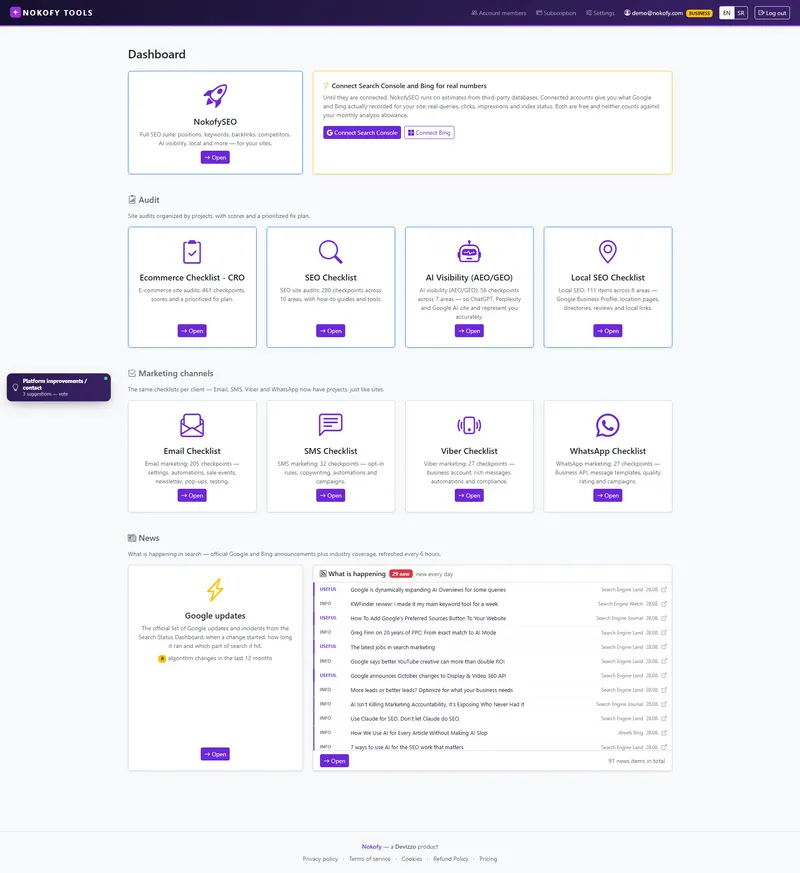
You open the tool and immediately know what changed. The dashboard is the only page you have to open. On it are all your sites, all the checklists, and a News section saying what Google and Bing have published since you were last here.
- 6h
- how often the news is refreshed
- 4
- urgency levels beside every item
- 5
- areas you can filter the news by
The problem: your traffic dropped on Tuesday and you find out why a month later
Google changes search without notice and without an email addressed to you. It announces that a big update has started, that goes round foreign forums, and within a few days everyone in the trade knows except you.
Meanwhile you’re looking at traffic down by a third and trying to remember what you changed on the site last week. Usually you changed nothing — Google changed.
Sometimes it wasn’t even an update but a fault on Google’s side, which they later admit and fix. If during that period you start rewriting your site in a panic, you’ll break what was working. That’s the most expensive kind of mistake in SEO: the cost comes from the reaction, not from the problem.
How it works
The dashboard is the first screen after login and it’s made of four parts.
Your sites. At the top are all the sites you run, each with its own way in. One click and you’re inside, with no dropdowns and no switching between accounts. If you run five client sites, all five sit side by side.
An invitation to connect your real data. Directly below is a bar leading to Google Search Console and Bing Webmaster Tools, explaining why it’s worth it: until they’re connected the tool runs on estimates from independent databases; connected accounts give what Google and Bing actually recorded. Once you connect them, the bar disappears and your numbers take its place.
All the checklists, with item counts. Cards for every checklist, each with the number of items it holds. You don’t have to remember where anything is — you see how much there is in each area and go where you need to be.
News. The bottom half of the screen is a list of what has changed in the world of search. It isn’t a blog and isn’t a newsletter, but a working list you look at before making any decision about the site.
What you get
News you don’t have to hunt for on forums. The tool follows official Google and Bing announcements plus specialist sources that notice a change first. The list refreshes every 6 hours, so what was published before breakfast reaches you the same day.
An urgency level and a source marker. Every item carries a Critical, Important, Useful or Info label — when you have five minutes, you read only what’s critical. When the same change is confirmed from several places, the number of sources is shown, so a rumour and a confirmed change are distinguishable at a glance.
Filters by area and type. You filter by area (SEO, Google Ads, AI and GEO, Technical, Local) and by type — algorithm, warning, policy, new feature, technical change, research, guide, industry. If you run a local business, two clicks leave only what concerns you.
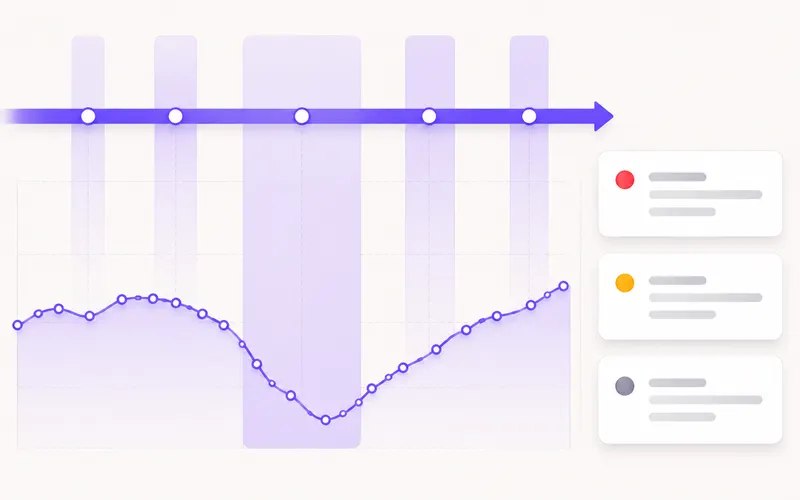
The official list of Google changes and a timeline. A separate section is the list of Google algorithm changes and incidents from Google’s own search status dashboard. For every change it says when it started, how long it lasted and which part of search it affected. On the timeline the length of the bar shows the real duration, so you immediately see the difference between a change that passed in two days and one that dragged on for three weeks.
Every type of change has a full explanation: a core update in how things are judged, a spam update, a reviews update, helpful content, Discover, page experience and — most importantly — a service disruption. A disruption carries a plain warning that this is a problem on Google’s side, not an algorithm change and not your fault, and that the site shouldn’t be touched because of it.
The most useful way to use all of this: find the date your traffic dropped and check whether it overlaps with an update. That’s why update periods are drawn across your own traffic chart — the drop and its possible cause sit in the same picture.
A real example
The owner of a bathroom fittings shop sees traffic down by almost a third. First thought: we broke something when we changed the categories. Second: let’s urgently rewrite the product descriptions.
Instead he opens the dashboard. On the traffic chart sits a coloured band exactly over the day the drop began. He clicks it and gets the detail: a core update, lasted eleven days, finished four days ago. In the news above are two items about the same event marked as confirmed from several sources, both labelled Important.
He rewrote no descriptions. He waited for the change to settle, then started with the keywords that had fallen from third to seventh place. Without this screen he would have spent two weeks on rewrites that had nothing to do with the drop — and afterwards wouldn’t have known what helped and what hurt.
Who it’s for
A business owner with no time to follow the news — you don’t have to read foreign forums. What matters sits on your first screen, with a label saying how urgent it is.
An agency with several client sites — every site is on the same screen. And when a client calls asking what happened last week, the answer is already open.
A marketer who has to explain a drop to somebody — the date of the change, its duration and the official source turn „I don’t know why it fell“ into a tidy answer in a meeting.
Honestly: matching dates isn’t proof of cause. An update band across your chart tells you it’s worth checking, not that the matter is settled — a drop can also come from a technical error on the site, the season, or a competitor’s move. We follow the news from publicly published sources, so what Google never announces we can’t show you either.
Frequently asked questions
How often is the news refreshed?
Every 6 hours. Which means an item published in the morning reaches you the same day at the latest, rather than a week later after it has passed through five retellings on forums.
Where does the news come from?
From official Google and Bing announcements and from specialist sources that notice changes first. Every item carries the source name and date, and when the same thing is confirmed in several places, the number of sources is shown too.
What does „service disruption“ mean and do I need to do anything?
It means something on Google's side was working incorrectly. That isn't an algorithm change and isn't your fault. The recommendation is plain: don't touch anything on the site because of it. When Google fixes it, the numbers usually come back by themselves.
Can I see only what concerns me?
Yes. You filter by area — SEO, Google Ads, AI and GEO, Technical, Local — and by type, for example algorithm, warning, policy or new feature. A local tradesman and an online shop don't have to look at the same list.
How do I know a drop was caused by an update?
You compare the dates. Update periods are drawn across your traffic chart, so you see any overlap in one picture. That isn't proof, but it's the first thing to check before you change anything on the site.
Do you republish other people's articles?
No. We show the headline, a short extract, the source and the date, and the full text stays with the source. We tell you what came out and take you to the original.
Works together with
The tools in Nokofy build on each other — here is what naturally goes with this one.
Site overview
For depth on one site: positions, traffic, opportunities and a list of what to do next.
More →Search Console and Bing
Connect in a couple of minutes, free, and from that moment you're looking at your real numbers.
More →Checklists and priorities
Cards on the dashboard lead into a concrete task list, sorted by importance.
More →Create an account and see your first screen
Add a site and the dashboard is there — with the checklists, with the news and with the list of Google changes. In five minutes you know more about what's happening to your site than after half a day of reading forums.
No card · No contract · Cancel anytime