White label SEO reports with your name and your colour
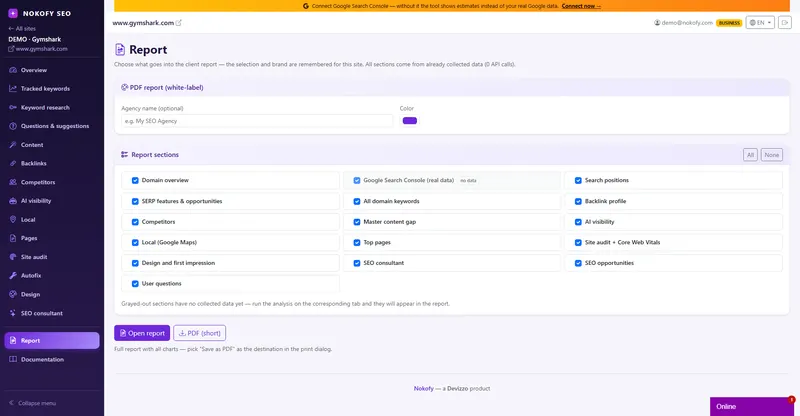
You tick what goes in, type your agency name and colour, and the report comes out with your branding instead of ours. It's filled from data the tool already holds, so there's no waiting and no extra cost.
- 14
- sections you can switch on or off
- 2
- formats: full HTML and a short PDF
- 0
- surcharge for putting your own brand on it
The problem: half a day for one report nobody reads to the end
If you run client sites, you know how it goes. End of the month. You open three tools, take screenshots, move numbers into a spreadsheet, then into a presentation, then manually erase other people’s logos so the client doesn’t see what you work with. Half a day per client, every month, for work nobody pays you for separately.
If you’re a marketer inside a company, the version is the same, only the audience differs: your boss wants something short for a meeting, and you’re choosing which of thirty reports to show a person who doesn’t know what CTR is.
And with the big tools there’s a third problem. A white-label report is often a separate plan, with a surcharge. You pay in order to hide that you’re paying.
How it works
You choose what goes in. You open the report and a list of sections with checkboxes is in front of you. You tick only what you need for that particular conversation. For a client paying for content that’s one selection; for a technical meeting, an entirely different one.
You type in your brand. One field for the agency name and one colour picker. From that moment the report carries your name and your colour, and ours is nowhere. No surcharge and no separate plan.
You download. The report comes out as an HTML document that opens in any browser and can be saved as PDF through print, so it’s emailed like any other document. Alongside it comes a short PDF for when only the essentials are needed.
The section choice and branding are remembered per site. Next month you don’t choose again — you open and download. Each client can have a different selection, because it’s stored separately.
What you get
Everything the tool collects can go into the report, and every section is ticked individually. That’s why the same site can have a short report for the client and a long one for your archive.
- Domain overview — domain strength, traffic, keywords, the basic state of the site.
- Search Console — measured data: clicks, impressions, CTR and positions, exactly as Google recorded them.
- Positions — where your tracked keywords stand and how they moved.
- Rich results and opportunities — which richer formats you appear in and where there’s room to enter.
- All domain keywords — the full list of queries search shows you for at all.
- Backlink profile — who links to you, what’s new, what’s gone.
- Competitors — how you stand against those taking the same queries.
- Topics you don’t cover — what competitors write about and you don’t.
- AI visibility — whether AI mentions you when somebody asks about your service.
- Local — how you stand in your own town.
- Top pages — which pages genuinely bring visitors.
- Site audit and speed measurements — technical findings, page speed and stability.
- SEO opportunities — concrete things that can be fixed.
- User questions — what people ask around your topic.
Sections without data are greyed out. If a section has no data yet — say you haven’t connected Search Console or haven’t run an audit — it can’t be ticked. You will never send a client a blank page with a heading and nothing beneath it.
Your brand, no surcharge. You type the agency name and pick a colour, and the report the client receives looks like your document, because it is. There’s no logo of ours and no footnote to delete.
Zero new calls, zero extra cost. The report isn’t built by the tool going out to collect data again; it’s filled from what has already been collected. That’s why it’s ready instantly and consumes nothing from your monthly allowance. You can generate it ten times in a day while hunting for the right combination of sections.

A real example
A freelancer runs seven sites. Until now the end of the month meant two working days on reports: screenshots, copying numbers, manually erasing other people’s marks.
He goes through the setup once. For the dental practice site he ticks domain overview, Search Console, positions, local and top pages, and switches the rest off, because the practice owner has no interest in a backlink profile. For the machinery company he ticks competitors, topics not covered and all domain keywords. He types in his name and his colour.
The next month he chooses nothing. Opens the site, clicks report, downloads. Seven reports in under twenty minutes, each with his branding, without a single cost beyond what he already pays.
An effect he didn’t expect: since a report no longer costs half a day, he sends it monthly instead of quarterly. Clients ask less often what exactly he does for his money — and that’s the difference between a client who stays and a client who cancels.

Who it’s for
An agency or freelancer — white-label reports without a surcharge, and choices remembered per site, are the difference between reporting as a cost and reporting as a routine. The client sees your brand, not ours.
A marketer inside a company — a short PDF for the meeting and full HTML for those who want the detail. You don’t have to choose between too short and something nobody will read.
A business owner — a report is the easiest way to see once a month whether things are moving, without opening individual screens. And to show the same thing to an accountant or a partner.
Honestly: a report shows what the tool already has, so it’s exactly as good as the data underneath it. If Search Console isn’t connected, the measured-data section stays locked and the report leans on estimates. Also, this is a report on the state of things and what changed, not a replacement for your explanation — the numbers go to the client, the story still comes from you.
Frequently asked questions
Is white-label branding an extra charge?
No. The agency name and colour are part of the tool, not a separate plan. The report you send a client carries neither our name nor our logo.
What does generating a report cost me?
Nothing beyond the subscription. The report is filled from data already collected — no new calls and no extra cost — so you can generate it as many times as you like while choosing the right combination of sections.
What format do I get?
An HTML document that opens in any browser and can be saved as PDF through print. Alongside it comes a short PDF for when only the essentials are needed.
Do I have to choose the sections again every month?
No. The section choice and branding are remembered per site. Next time you just open it and download.
What if a section has no data?
It's greyed out and can't be ticked, so the report never ends up with a blank page carrying a heading and nothing under it. When the data arrives — say when you connect Search Console or run an audit — the section unlocks by itself.
Can I send different reports to different clients?
Yes. The configuration is remembered separately for each site, so one client can get a short local report and another a full technical one.
Works together with
The tools in Nokofy build on each other — here is what naturally goes with this one.
Site overview
Most of the report is exactly what you see in the overview: indexes, positions, opportunities and tasks.
More →Search Console and Bing
Once connected, a section with measured data enters the report instead of estimates.
More →Site audit
Technical findings become a report section as soon as you run a scan once.
More →Make a report that looks like it took you half a day
Add a site, tick the sections, type your name and colour. Two clicks and you have a document ready to go to a client. The free plan asks for no card, so you can see for yourself how it looks.
No card · No contract · Cancel anytime