AI content generator that writes from real search data
A text isn't written in one breath, but in six steps. You choose the topic, the length and the type, and Nokofy first builds the structure, then the intro, then each section separately, then the questions and the conclusion. The finished article arrives with an image, a FAQ block, structured data and a quality score.
- 6
- steps instead of one prompt
- 10–18
- passes over the text per article
- 11
- checks in the 0–100 SEO score
The problem: a text written in one breath comes out empty
You have probably already asked an AI to write something for your site. You type a topic, get a thousand words in thirty seconds, read it — and feel that something is off. The text is grammatically tidy but empty. The third paragraph repeats the first in different words, there isn’t a single concrete fact, and you have no idea whether anyone searches for that topic at all.
The reason is simple. When a whole article is requested in one go, everything has to fit at once — so it comes out thin, shallow and evenly uninteresting. There is no step where somebody checks whether a section has enough substance, whether it repeats itself, whether the answer the reader came for is missing.
And then the second half of the job starts, the one nobody mentions to you: a title and description at exactly the right length, a table of contents with links to the sections, a block of common questions, structured data Google reads, an image with alt text, internal links to your existing pages. That’s an hour and a half per text, and that’s for someone who knows what they’re doing.
How it works
Nokofy does that entire second half by itself, and the first half — the writing — it breaks into steps, so the text has room to breathe.
First the structure is built: title, main sections and their order. If you want to see the plan before spending a credit, click „Suggest structure“ and get the title and the list of sections for free. Don’t like it — change the topic and try again, still at no cost.
Then the intro is written separately, with the topic and structure already in front of it, so it promises exactly what the text actually delivers. Then comes the heart of the process: each section is written on its own, around 250 words, knowing what has already been said. If one comes out shorter than 60% of its target, only that section is regenerated — not the whole article.
Finally a block of common questions is added, five or six items with answers of 40 to 80 words, then a conclusion that points the reader at the next step, then everything is assembled into one page.
That’s 10 to 18 passes over the text per article. Which is why it takes a minute or two instead of thirty seconds — and why it reads like a text rather than a filled-in form.
What one article gives you
You pick a length of 1,000, 1,500 or 2,000 words and one of four types: a Guide explains the topic from the ground up, How-to turns sections into steps, a List gives the „Top N“ format, and a Comparison puts two choices side by side, with a table required. You pick the type by the question: „how much does it cost“ wants a guide, „how do I install it“ wants instructions, „this or that“ wants a comparison.
Along with the text comes everything that otherwise gets added by hand:
- a search title of 50 to 60 characters and a description of 150 to 160
- a „In short“ block with three to five takeaways right below the title
- a table of contents with links, as soon as the article has three or more sections
- up to three images in WebP, each with alt text in the article’s language
- structured data Google reads, including FAQ and the path through the site
- around five internal links, chosen from twenty candidates on your site and earlier articles
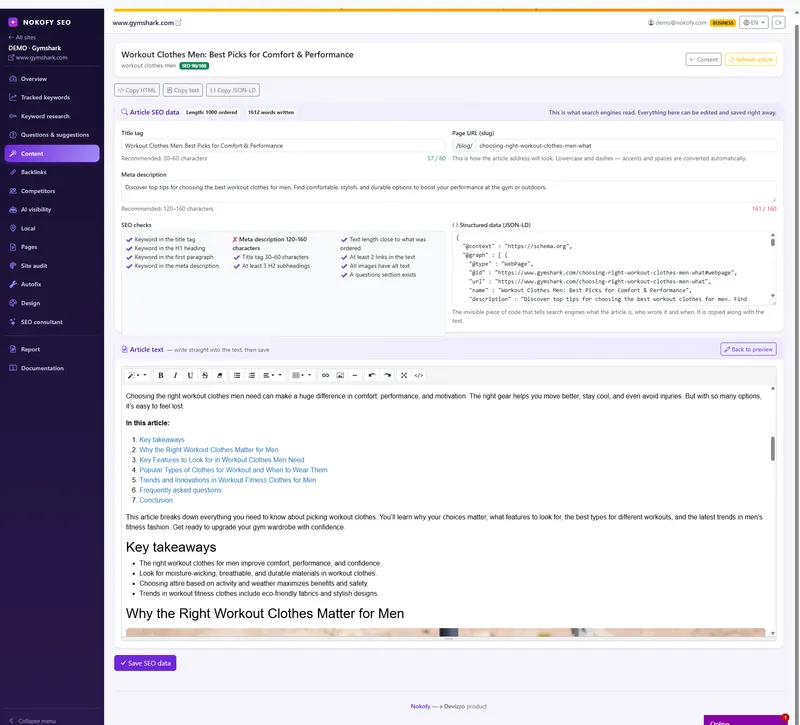
At the end comes an SEO score from 0 to 100 across eleven checks — from the keyword in the title and first paragraph to whether every image has alt text. Below 60 the tool tells you plainly that the text isn’t ready for the site. The finished text then goes through an editor once more, looking for repetition, empty phrases and claims without backing, and marks what it finds.
The finished article lands in the „Content“ tab and waits for you — the tool tells you it’s ready for review. You open it, read it, polish it in the editor, and then publish it yourself: copy the finished HTML, the plain text or just the structured data and put them where you need them. Nokofy doesn’t touch your site and sends nothing to it — publishing is and remains your decision.

A real example
A joiner in Novi Sad has a list of seven topics. He starts with the question about the price of a fitted kitchen, because it has the highest volume. First he asks for „Suggest structure“ and gets a title and eight sections, free. He sees that one section is wrong, narrows the topic and repeats. Only when he likes the plan does he let it write.
He picks 1,500 words and the Guide type. One section comes out short and the tool rewrites it by itself. A minute later a finished page arrives: a 57-character title, a 154-character description, an „In short“ block with four takeaways, a table of contents, three images with alt text, six questions in the FAQ block and five links to his gallery and service page. SEO score: 87.
For the second topic he picks the Comparison type, so he also gets a table. For the third he picks How-to, so the sections become steps. He opens the editor, adds a sentence about his workshop, changes one heading and leaves the rest. He copies the finished HTML and pastes it onto his site — that’s the only part he does by hand. Finally he drops all seven topics into the publishing plan, sets the pace to two articles a day, and the tool schedules when each text gets written while he publishes them as they arrive.

Who gets the most out of this
If you run your own business and have nobody to hand the writing to — two articles a month is a realistic pace for a small site, and here you get them for ten minutes of work instead of two evenings.
If you’re the whole marketing department — the publishing plan takes up to 50 topics at once, at a pace of one to ten articles a day, so you order a month of content on Monday and publish the texts as they arrive.
If you run sites for other people or have a shop — a 1,500-word text from a copywriter is 30 to 80 euros, and here it’s included in the subscription, together with the structured data and internal links somebody would otherwise add by hand. And the Comparison and List types are exactly the formats buyers read before deciding, and exactly the ones product descriptions never cover.
Honestly: this is an excellent first draft, but it isn’t your text until you’ve read it. A concrete fact from your workshop, your price and your experience are what the machine doesn’t know — and that is precisely the difference between a text that sits there and a text that sells.
Frequently asked questions
Does Google penalise text written by AI?
No. Google penalises worthless content, no matter who wrote it. Our articles answer questions people genuinely ask, have the structure search expects, pass an editorial check and get a score — and you review and polish them before they go on your site. Publishing is always your move: nothing reaches your site without your decision, and the quality score tells you in advance whether the text is ready.
Can I change the text before publishing?
Yes, and that's how it's meant to work — publishing is your step. Everything is edited here: the text, the headings, the search description. When you're happy, you copy the finished HTML, plain text or just the structured data and put it on your site, wherever you need it. The tool only tells you when an article is ready for review.
What does the SEO score mean and what if it's low?
It's the sum of eleven checks worth 0 to 100 points — from whether the keyword is in the title and the first paragraph, to whether every image has alt text and a FAQ block exists. Below 60 the tool tells you plainly that the text isn't ready for the site. You see which check failed, so you know what to fix before publishing.
Is there a charge per article?
No, articles are included in the plan. The only extra is an image made specifically for the text — that's one more credit, and only if you choose it. If image generation fails for any reason, the credit is returned.
What language does it write in?
48 languages are supported, and it writes with an understanding of how people actually write and ask in each one. Image descriptions are written in the language of the article.
What if I've already written about that topic?
The tool spots the duplicate and skips it without spending a credit. And if an old text has lost strength, the „Refresh article“ button rewrites two sections and updates the modified date, instead of you making a new text about the same thing.
Works together with
The tools in Nokofy build on each other — here is what naturally goes with this one.
Questions and suggestions
Every topic starts here — real Google questions with search volume.
More →Tracked keywords
The keyword from a published article enters tracking by itself, so you see movement from day one.
More →Keyword research
For finding new topics you don't rank for at all yet.
More →Write one article and see what it looks like when it arrives finished
Create an account, pick a topic and click „Suggest structure“ to see the plan before you spend anything. If you like it, let it write — the whole text, with an image, questions and a score, waiting in the editor.
No card · No contract · Cancel anytime