Skip to content
nokofy

Glossary

Fifty SEO terms

Every term in two to four sentences, without the jargon — and beside each one it says where you see it in your account. If somebody told you your site is “missing a canonical” or has “cannibalisation”, here you'll find out what that is and whether to worry.

50 terms · Last updated: August 2026

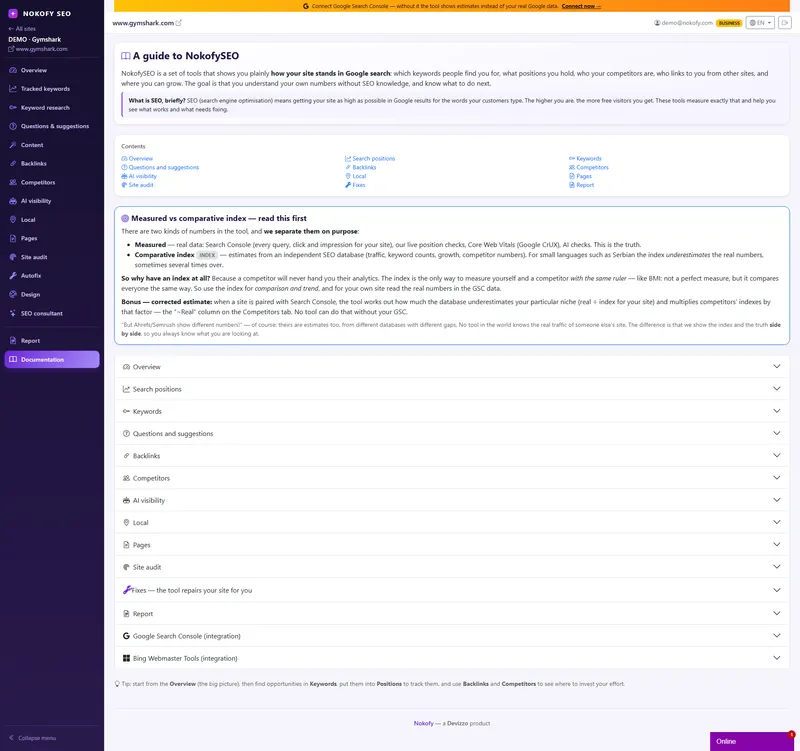
Screenshot: documentation and the glossary inside the Nokofy tool
A screenshot from the tool — hovering stops the scroll

A

Alt text

A short description of an image written into the page's code. It serves people who can't see the image (screen readers, a slow connection) and the search engine, which doesn't “look at” the picture but reads its description. Without alt text your images bring you nothing in image search, and the page loses accessibility.

Where you see it in Nokofy

The site audit pulls out the “images without alt text” finding with a list of addresses. Images in the content generator get alt text automatically.

Site audit → Content generator →

Anchor text

The visible words you click on when something is a link. The search engine infers from them what the page being linked to is about, so “custom kitchens Manchester” says far more than “click here”. If too many links to you share the same anchor, the profile looks artificial.

Where you see it in Nokofy

Backlink analysis — the anchor text column and the anchor profile analysis with a verdict of natural, borderline or risky.

Backlink checker →

B

C

Canonical

A tag that says which address is the main version of a page when the same content is reachable at several addresses. Without it, search decides for itself, and the version it picks may not be the one you want ranking. Shops hit this constantly, because filters and sorting generate new addresses for the same category.

Where you see it in Nokofy

Site audit — the “addresses, indexing and security” group of findings.

Site audit →

Content gap

The topics your competitors rank for and you have no page about at all. It's the fastest list of what to write next, because somebody else has already proven that demand exists. When several competitors cover the same topic, the gap is more certain than any hunch.

Where you see it in Nokofy

Competitor analysis — the “master content gap” pulls out keywords at least two competitors rank for and you don't.

Competitor analysis →

Conversion

The moment a visitor does what you brought them for: buys, sends an enquiry, calls, subscribes. Traffic without conversion is a cost, not a result. That's why the conversion rate — the share of visitors who complete the action — matters more than the number of visits.

Where you see it in Nokofy

The CRO checklist — 461 items on why a visitor doesn't complete the action and what concretely to change.

Checklist tool →

Core Web Vitals

Three measurements of how a page behaves for a real visitor: how quickly the main content appears, how quickly it responds to a click, and how much the layout jumps while loading. Google uses them as a ranking signal, but the bigger effect is on people — a slow page loses visitors before it's even read.

Where you see it in Nokofy

Overview — speed from real visits; Site audit — the “Speed” area.

Site overview → Site audit →

CPC

The price of a click in advertising for a given keyword. Even if you never run ads, it's a useful signal: a high CPC means somebody is paying real money for that keyword, which means it brings customers. A keyword with volume but a CPC near zero is usually curiosity, not intent to buy.

Where you see it in Nokofy

Keyword research — the CPC column and the filter on it; and beside every tracked keyword.

Keyword research → Rank tracker →

Crawl

The process in which a bot goes through a site page by page, following links, and reads what's on them. Search engines do it to know your pages exist; audit tools do it to find problems. A page no link reaches is usually never crawled.

Where you see it in Nokofy

Site audit — the crawler starts from the homepage, follows internal links and pauses two seconds between pages.

Site audit →

CTR

The share of people who clicked out of everyone who saw you in the results. If a thousand people saw your page and thirty clicked, the CTR is 3%. A low CTR at a good position almost always means the title or description doesn't say what the person is looking for — a five-minute fix with a visible effect.

Where you see it in Nokofy

Rank tracking and Page analysis — “CTR opportunities” calculated from Search Console data.

Rank tracker → Page analysis →

D

Disavow

A file you send to Google saying which links to your site you want ignored. It's used when somebody points spam links at you, or when an old campaign left links you no longer want to answer for. It's a last resort, not routine maintenance.

Where you see it in Nokofy

Backlink analysis — “disavow candidates” (spam score 30 and above) and a ready disavow.txt file to send to Google.

Backlink checker →

Dofollow and nofollow

Two kinds of link. A dofollow link passes on part of the linking site's strength; a nofollow one carries a tag telling search not to count it as a recommendation. Comments, forums and most directories are nofollow. A natural profile has both — one made only of dofollow links looks bought.

Where you see it in Nokofy

Backlink analysis — the link type column in the table and the ratio between the two.

Backlink checker →

Domain authority

A score of your site's strength in the eyes of search, expressed as a number. It isn't an official Google figure but a tool's estimate, calculated mostly from the quality and number of sites linking to you. It's useful for comparing against competitors, not as a goal in itself.

Where you see it in Nokofy

Backlink analysis — the “Domain Rank” tile; and in competitor analysis, when you compare yourself with others.

Backlink checker → Competitor analysis →

Duplicate content

The same or nearly the same text on several addresses — yours or somebody else's. Search then has to choose which version to show, and the choice may not be yours. It happens most in shops with supplier descriptions and on sites where the same text sits under several categories.

Where you see it in Nokofy

Site audit — “duplication clusters”, duplicate titles and duplicate meta descriptions.

Site audit →

E

E-E-A-T

Experience, Expertise, Authoritativeness and Trust — the four things Google's quality raters look for. In practice it means: say who wrote the text, why they know the subject, where the numbers came from, and how somebody can reach you. It matters most on topics touching health, money and law.

Where you see it in Nokofy

The SEO and CRO checklists — items about authors, the About page, contact details and citing sources.

Checklist tool →

F

G

GEO and AEO

Optimising for answers rather than for links. AEO (answer engine optimisation) is about being the source an answer is drawn from; GEO (generative engine optimisation) is the same idea for AI assistants that compose an answer from several sources. In practice both come down to: answer the question clearly, immediately, and back it with data.

Where you see it in Nokofy

AI visibility — whether assistants cite you; Site audit — the “AEO readiness” area.

AI visibility → Site audit →

Google Business Profile

Your company's free listing on Google, the one shown on the map and to the right of the results. For anyone with a physical location or a service area it's the single strongest local signal — hours, category, photos and reviews decide whether you appear on the map at all.

Where you see it in Nokofy

Local SEO — your position on the maps, ratings and reviews, plus a local checklist of 111 items.

Local SEO →

H

H1, H2, H3

The heading levels that give a page its structure. H1 is the page's main title and there should be exactly one; H2 marks the main sections and H3 the subsections beneath them. Skipping levels or having several H1s confuses both readers and search.

Where you see it in Nokofy

Site audit — missing or multiple H1s and skipped levels; the content generator builds them itself.

Site audit → Content generator →

I

Impression

One appearance of your page in the search results, whether or not anyone clicked. Impressions show demand: if you have many impressions and few clicks, people are searching for the topic but your title isn't convincing them. If you have no impressions, search isn't showing you at all.

Where you see it in Nokofy

Overview and Page analysis — impressions from Search Console, alongside clicks and CTR.

Site overview → Page analysis →

Indexing

Search storing your page in its database so it can be shown in results. Being crawled isn't the same as being indexed — a page can be read and then left out, most often because it's thin, duplicated or blocked. A page that isn't indexed doesn't exist as far as search is concerned.

Where you see it in Nokofy

Page analysis — a flag for whether the page is indexed; Site audit — a five-step “index funnel”.

Page analysis → Site audit →

K

Keyword

The word or phrase someone types into search. It doesn't have to be one word — most real searches are three to six words long. The point isn't to guess what people “should” search for but to find out what they actually type, and how many of them do.

Where you see it in Nokofy

Keyword research (new opportunities), Questions and suggestions (the real questions) and Rank tracking (where you are now).

Keyword research → Question research → Rank tracker →

Keyword cannibalisation

When two of your own pages compete for the same keyword. Search doesn't know which to show, splits the signals between them, and both end up worse off than one strong page would have been. It's usually solved by merging the two texts or by pointing one at a different question.

Where you see it in Nokofy

Rank tracking — the “cannibalisation” section names both pages and the keyword in dispute.

Rank tracker →

Keyword difficulty (KD)

An estimate, usually 0 to 100, of how hard it is to reach the first page for a keyword. It's calculated mostly from the strength of the sites already there. It's an estimate rather than a verdict — a young site is better off starting with keywords under 30 and coming back to the hard ones later.

Where you see it in Nokofy

Keyword research and Rank tracking — the “difficulty” column, and a filter on it.

Keyword research → Rank tracker →

L

llms.txt

A proposed file at the root of a site that tells AI models which content matters and how to read it. It isn't a standard yet and not every model uses it, but it costs nothing and it's the clearest signal you can give an assistant about what your site is.

Where you see it in Nokofy

The site audit checks whether you have one — and the tool can generate it for you, ready to upload.

Site audit →

Local pack

The block of three companies with a map that Google shows for searches with local intent. It sits above the ordinary results, so for a local business it's the most valuable place on the page. Which three appear depends on distance, relevance and reputation — and it changes with where the person searching is standing.

Where you see it in Nokofy

Local SEO — your position in the local pack and a list of every company inside it.

Local SEO →

Long-tail

Longer, more specific searches — “which dishwasher for a small kitchen” instead of “dishwasher”. Individually they bring little traffic, but there are many of them, there's less competition, and the person searching is closer to a decision. For a new site they're the only realistic way in.

Where you see it in Nokofy

Keyword research — a filter on the number of words in the phrase and on search intent.

Keyword research →

M

Meta description

The short text under the title in the search results. It isn't a ranking factor, but it decides whether somebody clicks. If you don't write it, search composes one from the page, and the result is usually worse than what you'd have written yourself.

Where you see it in Nokofy

The site audit measures its length in characters and pixels; the content generator writes it to the right length.

Site audit → Content generator →

O

On-page and off-page

Two halves of SEO. On-page is everything you control on the site itself: text, headings, structure, speed, internal links. Off-page is everything happening outside it: who links to you, who mentions you, what the reviews say. On-page is where you start, because it depends only on you.

Where you see it in Nokofy

On-page leads to the Site audit and the checklists; off-page to Backlink analysis and AI visibility.

Site audit → Backlink checker →

Organic traffic

Visitors who arrive from the unpaid search results. Unlike ads, it doesn't stop the day you stop paying — but it also doesn't arrive the day you start. That's the whole trade-off of SEO in one sentence.

Where you see it in Nokofy

Overview — estimated and measured traffic; Page analysis — which page brings how much of it.

Site overview → Page analysis →

Orphan page

A page no internal link on your site points to. It exists, but neither a visitor nor a crawler can reach it by clicking. It usually happens after a redesign or when a category is removed, and it's fixed by adding one link from a relevant page.

Where you see it in Nokofy

Site audit — a list of orphans, cross-checked against real clicks from Search Console.

Site audit →

P

PAA (People also ask)

The block of related questions Google shows in the middle of the results, each expanding into a short answer. It's a free look at what else the person searching is wondering about — and a ready list of subheadings for your next article.

Where you see it in Nokofy

Questions and suggestions — PAA from live search, with volume and a button to write an article about that question.

Question research →

Position (ranking)

Where your page sits in the results for a given keyword. First place takes the largest share of clicks by a wide margin, and below tenth place — the second page — traffic falls to almost nothing. Positions vary by location and device, which is why they're always measured for a defined setting.

Where you see it in Nokofy

Rank tracking — position, change, best ever and history up to 16 months back.

Rank tracker →

R

Redirect 301 and 302

Two ways of sending a visitor from one address to another. A 301 is permanent and passes on the strength of the old address; a 302 is temporary and doesn't. Using a 302 where a 301 belongs is one of the most common ways to lose rankings during a site move.

Where you see it in Nokofy

Site audit — redirect chains; Backlink analysis — a suggestion of where to redirect a broken link.

Site audit → Backlink checker →

Rich results

Search results shown with something extra: stars, a price, an image, an FAQ that expands, breadcrumbs. They're earned by structured data on the page. They don't lift your position directly, but they take up more space and pull more clicks from the same spot.

Where you see it in Nokofy

The Search Console and Bing panel — which rich results you appear in; articles get them automatically.

Search Console and Bing → Content generator →

Robots.txt

A file at the root of a site telling bots which parts they may visit. It's a signal, not a lock — it doesn't protect anything private, and a blocked page can still end up in the index if somebody links to it. Its most common damage is blocking something by accident.

Where you see it in Nokofy

Site audit — a check for whether you're accidentally blocking GPTBot, ClaudeBot or Google-Extended.

Site audit →

S

Search intent

What the person actually wants when they type something in: to learn, to find a particular site, to compare before buying, or to buy right now. Match the wrong intent and the best-written text won't rank — a guide can't win a page full of product listings.

Where you see it in Nokofy

Keyword research — the “intent” column and a filter on it, so you pick topics by who is looking for what.

Keyword research →

Search visibility

A single number summarising how present you are in search across all your tracked keywords, weighted by their volume and your position. It's more useful than any individual position, because it shows whether the site as a whole is moving rather than one keyword having a good week.

Where you see it in Nokofy

Rank tracking — the “Search visibility” card; it also goes into the monthly client report.

Rank tracker → Reports →

Search volume

How many times a keyword is searched in a month, for a given country and language. It's an estimate rather than an exact count, but it's the difference between writing about a topic a thousand people look for and one thirty people look for. Always look at it before deciding what to write.

Where you see it in Nokofy

Beside every row in Questions and suggestions, Keyword research and Rank tracking.

Question research → Keyword research →

SERP

The search engine results page — everything Google shows for one query. Today it's far more than ten blue links: ads, a map, an answer box, questions, videos, an AI overview. Which of those appear decides how much room is actually left for you.

Where you see it in Nokofy

Keyword research — the “SERP analysis” of the top ten results for your keyword.

Keyword research →

SERP features

Everything on a results page that isn't an ordinary result: the answer box, the People also ask block, the map, images, videos, the AI overview. Each one pushes the ordinary results further down, so being third on a page full of features is worth less than being third on a plain one.

Where you see it in Nokofy

Rank tracking — beside every keyword it says which features exist and who holds them.

Rank tracker →

Share of voice

How much of the total attention for a set of keywords belongs to you rather than your competitors. It answers a different question from a position: not “where am I” but “how much of this market do I actually hold”. It's the number that makes sense in a report to a client or a boss.

Where you see it in Nokofy

Overview — share of voice compared with competitors; AI visibility — the same principle for assistants' answers.

Site overview → AI visibility →

Sitemap

A list of your site's pages that you hand to search so it knows what exists. It doesn't guarantee indexing, but it speeds up discovery — especially for new pages and on big sites where internal links don't reach everything.

Where you see it in Nokofy

Site audit — sitemap errors and the “index funnel”; the tool can also generate one for you.

Site audit →

Sitemap.xml

The file format the sitemap actually takes: an XML list of addresses, usually with the date each was last changed. It sits at the root of the site and is submitted in Search Console. Once you have it, it takes care of itself — most systems update it automatically.

Where you see it in Nokofy

The site audit checks that it exists and is valid; if you don't have one, the tool generates it.

Site audit →

Spam score

An estimate of how likely a site linking to you is to be junk. It's calculated from signals like a very new domain, an enormous number of outgoing links, or no real content. A few high-scoring links are normal; many of them are a reason to look at the disavow list.

Where you see it in Nokofy

Backlink analysis — the “spam score” tile and the extraction of links scoring 30 and above.

Backlink checker →

Structured data (schema)

Code added to a page that says in machine-readable form what's on it: this is an article, this is a price, this is a question and its answer. Search reads it to understand the page more precisely and to show it more richly. Increasingly, AI assistants read it too.

Where you see it in Nokofy

Site audit — the “Structured data” area; every article written gets Article, FAQ and Breadcrumb markup.

Site audit → Content generator →

T

Thin content

A page with too little of value to justify its existence — a couple of sentences, a supplier's description, a category with nothing but a list. Length isn't the point in itself; the point is whether the page answers anything. Thin pages drag down the whole site's assessment, not just their own.

Where you see it in Nokofy

Site audit — the “thin content” finding, with a list of addresses and the word count per page.

Site audit →

Title tag

The page's title as it appears in the search results and in the browser tab. It's the strongest single on-page signal about what the page is, and it's what decides most clicks. Too long and search cuts it off; too vague and nobody clicks.

Where you see it in Nokofy

The site audit measures its length in both characters and pixels; the content generator writes the title to fit.

Site audit → Content generator →

TOC (table of contents)

A list of the sections at the top of a longer text, each linking to its part of the page. It helps the reader jump to what they came for, and it sometimes earns extra links under your result in search. On texts over a thousand words it's worth having.

Where you see it in Nokofy

Content generator — every article gets a table of contents with links automatically.

Content generator →

Terms in alphabetical order, with a magnifier over one column

Now that you know the terms — here they are on your site

Everything in this glossary is something Nokofy measures for you. Create an account, add your site and run an audit: in twenty minutes or so you see your own title tags, canonical tags, orphan pages and thin content — with the address, not in the abstract.

Terms are easier once you see them on your own site

The free plan asks for no card. You add the site, run an audit and instead of definitions you get your own addresses, your own titles and your own list of work.

No card · No contract · Cancel anytime