Technical SEO fixes applied to your site
The audit tells you what is wrong. Fixes go one step further: the tool proposes the exact change for every finding, you review it and click Approve, and we apply it to your site through a channel you connect once — WordPress, Shopify, Cloudflare, SFTP, Git or a single line of code. Every change is undone in one click.
- 10
- kinds of technical fix the tool proposes
- 7
- channels that apply them to your site
- 1 click
- to undo any change
The problem: the audit hands you a list, then you’re on your own
Every SEO tool makes you a list: 38 pages without a meta description, 120 images without alt text, 9 titles too long, structured data missing on 200 products. And then? You open page after page, invent the text, hunt for where it is edited in the CMS, or send it to a developer who has more important things to do. The list from February is still there in November.
That is why we built Fixes: a tool that proposes the change and then applies it to the site.
How it works
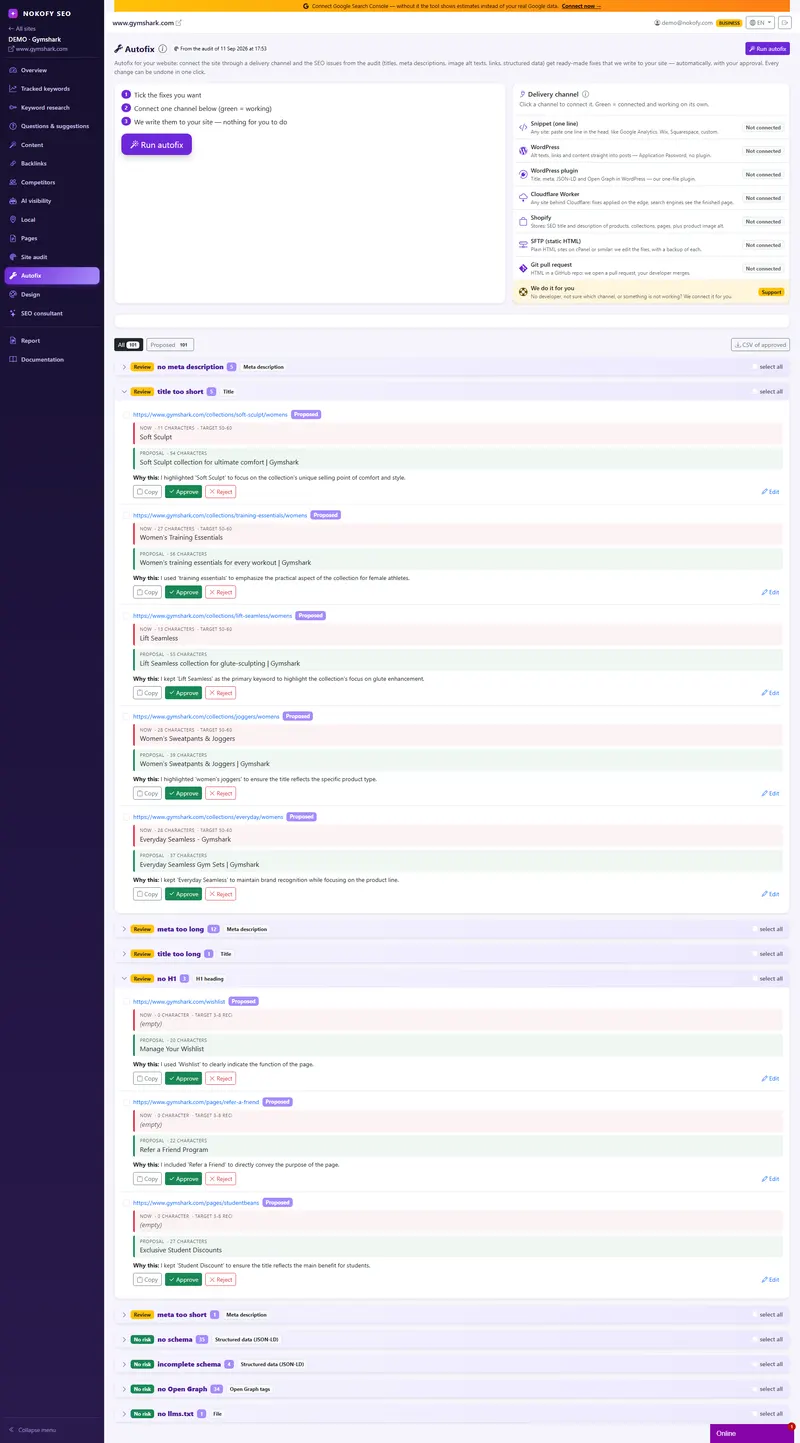
1. The tool proposes every fix. Click “Prepare proposals” and for every audit finding you get a concrete, short technical change: a title or meta description of the right length in the page’s language, with your brand and your Search Console queries; a missing alt text; structured data, Open Graph, internal links, sitemap and llms.txt derived from crawl data. You can edit every proposal by hand.
2. You review and approve. Every proposal shows how it is now, how it would be, the length, the rule it targets and “why this way”. Approve, reject or edit by hand. Tick several rows and approve them at once. Green is approved, red is rejected, so you always know where you are.
3. We write it to the site. Connect a channel once and from then on approved fixes reach the site by themselves:
- Snippet — one line in the head, for any site (Wix, Squarespace, Webflow, custom).
- WordPress — an application password, no plugin: alt texts, links, content.
- WordPress plugin — our one-file plugin for title, meta description, JSON-LD and Open Graph; works alongside Yoast, Rank Math and AIOSEO.
- Cloudflare Worker — fixes applied on the edge, search engines see the finished page.
- Shopify — SEO title and description of products, collections, pages and posts, product image alt.
- SFTP — static HTML sites on cPanel; we change only the targeted elements, with a copy of every file.
- Git pull request — for sites built from a GitHub repository; your developer just merges.
4. We check it is on the site. “Check on site” downloads the live pages and confirms what is really there. The next audit shows the improvement.
What never happens on its own
Nothing is written without your approval. Channels remember what they changed, so “Back to proposals” removes exactly that change. Over SFTP only HTML is touched, never PHP, nothing is deleted, and a copy of the original stays with us for 30 days. Passwords and tokens are encrypted and deleted in one click.
Who it is for
The site owner without a developer on hand, the agency that maintains twenty sites and does not want to retype meta descriptions by hand, and the store with a thousand products missing alt texts. Sites from a few dozen to a few thousand pages.
Frequently asked questions
Does the tool change my site without asking?
No. Nothing is written without your approval. The tool prepares a proposal, you see “now” and “proposal” one under the other with the reasoning, then approve, reject or edit by hand. Only approved fixes reach the site.
What exactly can it fix?
Page title, meta description, H1, image alt text, structured data (JSON-LD), Open Graph tags, internal link targets and anchor text, new internal links for orphan pages, sitemap.xml and llms.txt. Everything an audit finds most often.
Do I need a developer?
No. For WordPress you enter an application password or upload our one-file plugin. For any other site you paste one line into the head, just like Google Analytics. Shopify, Cloudflare Worker, SFTP and Git pull request are there for those who use them. And if you get stuck, click “We do it for you” and we connect the channel on your behalf.
What if I don't like a fix afterwards?
Click “Back to proposals” and the channel removes exactly that change from the site. For SFTP we keep a copy of every file for 30 days; the plugin and the snippet leave nothing behind — switch them off and the site is as before.
How do I know the fix is really on the site?
The “Check on site” button downloads the live pages and confirms every fix that is actually there. The next audit confirms it too.
How much does it cost?
Fixes are part of the Pro and Business plans, with no charge per fix. Preparing proposals is included in the plan.
Works together with
The tools in Nokofy build on each other — here is what naturally goes with this one.
The first site where the tool fixes errors for you
Create an account, run the audit, click Prepare proposals and see what the tool would change. Approving and writing to the site are part of the Pro plan — try it free for the first days.
No card · No contract · Cancel anytime