Skip to content
nokofy

How it works

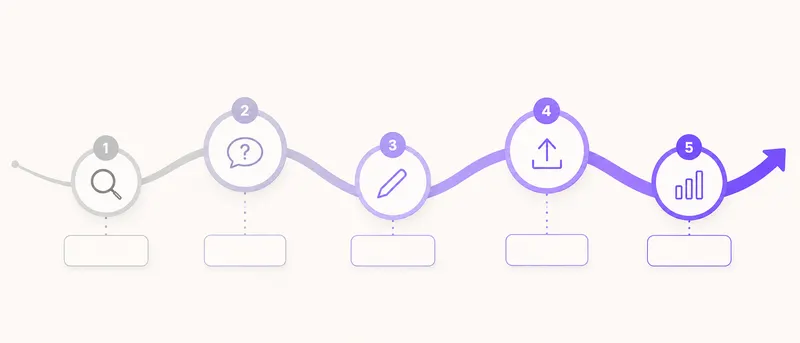
Five steps. You click, the tool does the work.

Research what people are asking, write the answer, publish it, track whether you moved up, refresh it before it slips. That's the whole job. Below it's broken down step by step — what you do, what the tool does, how long it takes and what you have at the end.

  1. 1. Research
  2. 2. Write
  3. 3. Publish
  4. 4. Track
  5. 5. Refresh
  6. and round again

Step by step

Exactly what happens from the moment you type the first keyword

Beside each step it says what your part is, what the tool does and how long that takes. No hidden work waiting for you later.

The path from the first check to a published article
Five steps, one account
  1. Research

    Ask Google instead of guessing

    What you do

    You open the “Questions and suggestions” tab, type one keyword from your business and click “Research”. If you want to exhaust the topic, you flip the “Deep research” switch first. That's all — two clicks and one keyword.

    What the tool does

    On your behalf it sends a series of searches and collects what Google itself offers as a continuation: 19 live queries sorted by type — nine questions, six suggestions, three comparisons and the base query. With it comes the “People also ask” block with the answer Google currently displays and the source it took it from, up to 200 related suggestions and the monthly search volume for every row.

    How long it takes Under a minute · two to three minutes with deep research

    What you have at the end

    A table of topics sorted by search volume, with a clear difference between what's searched a thousand times a month and what's searched thirty. Earlier research stays saved and you open it without spending your monthly allowance.

  2. Write

    Click the pencil and the article starts

    What you do

    You find a row you like, click the green “Write article” pencil, choose the length (1,000, 1,500 or 2,000 words) and the type of text — a guide, a how-to, a list or a comparison. You click “Create”. Three clicks, without writing a single sentence.

    What the tool does

    The text isn't produced in one go. It's written in steps: first the structure, then the introduction, then each section separately, then the common questions, then the conclusion — ten to sixteen steps per article. Along the way it adds a title and description for search at exactly the right length, an “In short” block at the top, a table of contents linking to the sections, an FAQ block, up to three images with alt text, structured data that Google reads and internal links to your existing pages.

    How long it takes A few minutes, in the background — close the window and come back when it's done

    What you have at the end

    A finished article you open in our editor, change wherever you like and add what only you know — the price, experience from the trade, an example from the field. The quality score tells you straight away whether the text is ready or still missing something.

  3. Publish

    You review and publish

    What you do

    You open the article on the “Content” tab, read it and polish it — change the text in the editor, change the title and description, watch the SEO score. When you're happy, you click “Copy HTML” (or plain text, or the structured data) and paste it wherever you need it on the site. Publishing is your decision — nothing goes to your site on its own.

    What the tool does

    It tells you when the article is ready for review and prepares everything that goes with the text: the title and description for search, structured data, a table of contents linking to the sections, images in a light format that doesn't slow the site down, and internal links to your existing pages. None of that is something you have to add or understand.

    How long it takes As long as it takes you to read the text · pasting is a matter of minutes

    What you have at the end

    A page that's technically ready from day one — with no touching up afterwards, no plugin to install on the site and no wondering whether you forgot something. And no surprises, because you read the text before it went out.

  4. Track

    From the day you publish, you have a measure

    What you do

    When you publish the article, the keyword it came from goes into rank tracking. If you want to track another keyword, you click “Track” in the research row — one click.

    What the tool does

    It measures where you are on Google for that keyword, keeps the history and shows the change week by week. With it, it pulls your real Search Console data: how many times you were shown, how many clicks you got and on which queries. When a position moves significantly, you get an email.

    How long it takes Measuring runs on its own, on a schedule · you need a minute a week

    What you have at the end

    An answer to the only question that really matters: are you climbing, and for exactly which keywords. Not a feeling but a number with a date — and it's the same number that goes into the report.

  5. Refresh

    We refresh before the text slips

    What you do

    You open the suggestion the tool sends you and click “Refresh”. One click, and not every month either.

    What the tool does

    It watches which of your texts are losing traffic and positions, and suggests them for refreshing itself. When you accept, it rewrites the key parts, fills in what's missing and updates the date. Google likes fresh content, and you don't have to remember what you wrote a year ago.

    How long it takes A few minutes per text, in the background

    What you have at the end

    Content that doesn't rot. Most sites decline not because something broke, but because everything stayed the same while search changed.

And then the loop starts again — with better data, because now you know what worked for you.

The first day

The first 15 minutes

You don't need a whole day to start. Here's the exact order for the first evening.

  1. 2 minutes

    Add your site

    You type in the address and choose the country and language. No hosting access needed, no installation, nothing to change on the site.

  2. 3 minutes

    Connect Search Console

    You click “Connect”, sign in with your Google account and pick the site. From that moment the tool works with your real click and impression data instead of an estimate. If you have Bing too, you connect it the same way.

  3. 1 minute

    Run an audit

    You click “Run audit” and let it work in the background. For a 50-page site it's done in about three minutes, for 500 pages in about twenty. Meanwhile you carry on.

  4. 2 minutes

    Run one research pass

    You type in one keyword from your business and look at what people actually ask. This is the moment most people realise why their site isn't working — because the topic they wanted to write about has thirty searches a month, and the one next to it has a thousand.

What you have at the end of day one: a site quality score, a list of problems sorted by importance, a list of topics with numbers and your first few keywords in tracking. About fifteen minutes in total — enough to know where you stand.

The first week and the first month

What the rhythm looks like once the dust settles

One afternoon a week. Below it also says what realistically shows in that period, and what doesn't.

The first week

You open “Checklists and priorities” and do the first five items. They're almost always simple things nobody got round to: a homepage title that doesn't say what you do, page descriptions search has to invent because you don't have any, contact details that aren't on every page, images with no alt text.

Then you run the first article — on the topic with the highest search volume from your research. You read it, add your own experience and publish. You put five to ten keywords into rank tracking so you have a starting point.

A realistic expectation

Nothing shows in search yet, and that's normal. Google still has to visit your new page.

The first month

The rhythm we recommend is one article a week and one afternoon a month for the technical side. That's about four hours of work a month, in total.

By the end of the month you have three or four published texts, the first technical problems from the audit resolved, and a month of position history. The first movements usually show on long, specific queries — the questions where there's practically no competition. For the main, short keywords it's too early.

A realistic expectation

The first signs of life on long queries, traffic still small. If somebody promises you more in a month, they're lying to you.

After three months

What you can realistically expect

SEO isn't instant and we won't pretend it is. Here's an honest schedule, based on how search actually works.

  1. 4 to 8 weeks

    First movements

    New pages enter the index, long queries start bringing the first visits. Positions move by ten places or so, but from 80th to 60th — which doesn't bring clicks yet, but is proof that something is happening.

  2. 3 to 6 months

    Serious results

    This is the moment the effect adds up: twelve to twenty published texts, the technical side sorted, a site Google already knows. That's when long queries enter the top ten and the main keywords start climbing. For most sites, this is where search traffic becomes a measurable source of enquiries rather than a statistic.

  3. 6 to 12 months

    The compound effect

    Older texts strengthen on their own, new ones start from better positions because the site has authority on the topic. This is the phase where the work from the first month pays back most.

What speeds it up

Consistency — one text a week beats ten texts in one week. Then the technical side sorted from the audit, and picking topics by search volume instead of by feel.

What slows it down

A very young domain, strong competition on the main keywords and two-month gaps.

An honest note. We'll never promise first place in a month. What we can promise is that at any moment you'll know where you stand, what you've done and whether you're moving.

What the tool does while you sleep

The work that happens without you

Most of what the tool does doesn't require you to be there. Here's what happens while you get on with your own job.

Automatic overnight checks

The tool goes through your site itself and runs around 150 technical checks. If something breaks — a link leading nowhere, a page suddenly unreachable, a title somebody deleted — you see it tomorrow morning, not in a month. Thirty checks a month on Pro is roughly once a day; a hundred on Business is more often still.

Scheduled refreshes

Positions, Search Console data and the state of your pages refresh on a schedule, by themselves. You don't have to remember to start anything — when you open the tool, the numbers are already new.

Rank tracking

Measuring goes at its own pace and the history builds itself. That's the only way to have a graph in three months instead of a memory.

AI visibility checks

The tool asks AI models questions from your industry itself and records whether it mentions you and in what light — every seven days on Pro, every three days on Business.

Search news every six hours

When Google publishes an algorithm change or something important shifts in search, it arrives in the tool. You don't have to follow foreign blogs to know why your positions dropped on Tuesday.

Email alerts

A message arrives when something needs your attention: a big change in position, a new critical finding in the audit, a finished article, a report ready. Everything else leaves you alone.

Your part of the job is one afternoon a week. The rest is on the tool.

Fifteen minutes today, the first result in a month

Create an account, add your site, connect Search Console and run the first research pass. That's the whole first day. If you like what you see, you carry on to the plan from here. If not — you haven't paid anything.

No card · No contract · Cancel anytime