SEO site audit that reads your site the way Google does
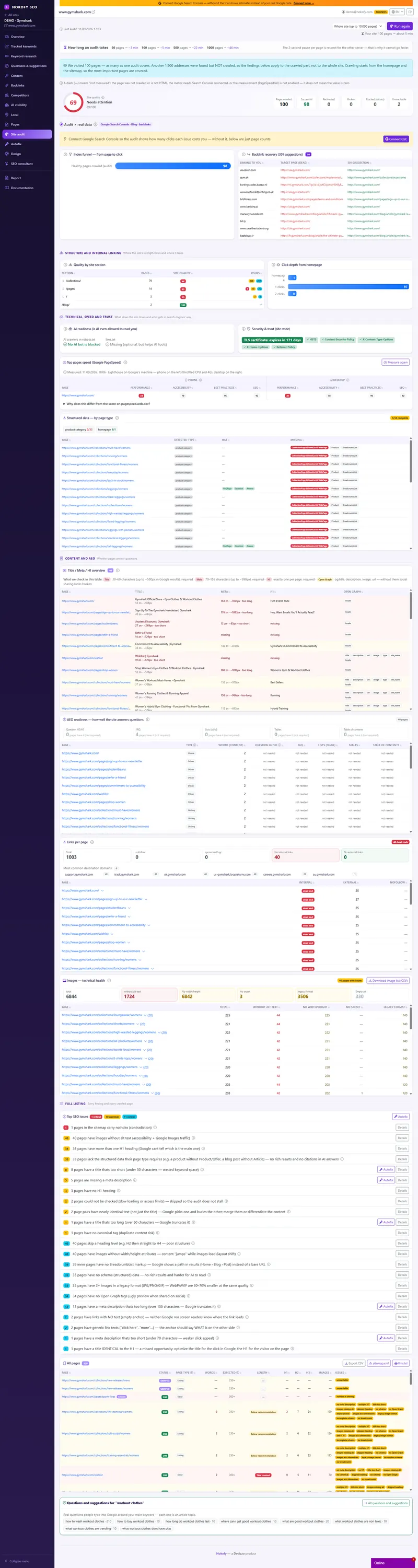
Your site looks fine to you. Google reads it differently. Our crawler goes page by page, follows your internal links and checks around 50 things on each one. At the end you get a site quality score from 0 to 100, a list of concrete problems with the address of each, and the order worth fixing them in.
- 65
- types of finding from one audit
- 9
- areas with their own score
- up to 1,000,000
- pages crawled, by arrangement
The problem: you look at your site like a person, Google reads it like a machine
You open your site and everything works. The menu opens, the images load, the contact form sends. Which is exactly why you don’t understand where the visitors are.
You click a product in the menu. Google has to find a link to it. If not a single internal link leads to that page — and that happens more often than you’d think — it effectively doesn’t exist for search. The same goes for a page buried four clicks deep, for three pages sharing one title, and for a link to a product you deleted a year ago. You also can’t see that your title is too long and search is cutting it in half, or that your SSL certificate expires in two weeks.
That’s what an audit is for: for somebody to walk every page instead of you and tell you what exactly is wrong — with the address, not in general terms.
How it works
You type the address and let it run. Nothing to install, no hosting access to hand over, and the audit runs in the background — close the window and come back when it’s done.
Our crawler is called NokofyAuditBot. It starts from the homepage, follows internal links and discovers page after page, exactly the way a search engine does. It pauses two seconds between pages so it doesn’t load your server, respects robots.txt, doesn’t fill in forms and doesn’t collect personal data. A 50-page site is done in about three minutes, 500 pages in about twenty-one.
Every page goes through around 50 checks, and one audit can produce about 65 different types of finding. At the end you don’t get a pile of errors, but a site quality score, scores across nine areas, and a list sorted by what costs you most.
What we check
This isn’t the full list, just what usually turns out to matter:
- Links and structure — broken links and, more importantly, which page they sit on. Redirect chains, orphan pages no internal link points to, click depth, and empty anchor text like „click here“.
- Titles and descriptions — we measure length twice, in characters and in pixels, because Google cuts a title at around 580 pixels and a description at around 990, and „W“ and „i“ don’t take the same room. Plus duplicate titles, missing or multiple H1s, and skipped heading levels.
- Content — thin content under 250 words, clusters of pages saying the same thing in the same words and smothering each other, and soft 404s (a page that says there are no results while telling the server everything is fine).
- Images and technicals — images without alt text, without set dimensions (which makes content jump while loading), without variants for smaller screens, and ones in old, heavy formats. Plus the mobile viewport and mixed content.
- Addresses, indexing and security — canonical tags, hreflang errors, over-long addresses, favicon and sitemap, SSL expiry with a warning 21 days ahead, and security headers.
- AI readiness — whether your robots.txt blocks AI crawlers, so assistants can’t even read you when somebody asks about your service; whether an llms.txt exists; and whether your headings look like questions and whether there are FAQ blocks, lists and tables a direct answer can be pulled from.
Site quality runs from 0 to 100. Critical findings enter with a weight of three, warnings with one, notices with 0.3 — so a small thing doesn’t drag the score down as much as broken checkout. Below that sit nine areas with their own scores, and each loses points in proportion to the share of pages affected — five bad pages out of ten hurts far more than five out of two hundred.
Alongside come four things people usually have to ask for separately: a „What changed since the last audit“ screen, findings cross-referenced with real clicks from Search Console, an index funnel (how many pages we crawled, how many are in the sitemap, how many Google shows, how many bring clicks) and internal link suggestions.

A real example
A shop with 480 pages. The audit takes about twenty minutes and returns a quality score of 61.
In the findings: 34 broken links, six of them sitting on category pages that still bring visitors today. 112 product pages share the same search description, because the theme builds it from a template. 27 pages are orphans — leftovers from an old menu removed during a redesign. Nine titles are longer than 580 pixels, so search cuts them off exactly where the brand name sits. And robots.txt blocks AI crawlers.
Cross-referencing with Search Console shows that three of those 27 orphans still bring visitors, and one broken page has a backlink from a news site. Those are the first four items on the list — not because there are most of them, but because they’re the most expensive. After the fixes a new audit shows what’s resolved and what has broken in the meantime; the score and trend are kept, so progress is visible across months.
Who gets the most out of this
If you run your own site — you don’t need to know what a canonical is. Open the list, do the first five things and the score climbs.
If you’re a marketer inside a company — you have evidence for the conversation with your developer, with a page address instead of „something’s wrong“.
If you run sites for other people or have a shop — an audit before taking on a client shows what you’re walking into, and the CSV export goes straight into the proposal. With hundreds of similar product pages, duplication, thin content and excessive click depth are a standing feature.
Honestly: an audit finds what can be read off a page. Whether your text convinces a person and whether your checkout is clear is not something a machine can judge — that’s what the checklists are for, and only together do they cover the whole site.
Frequently asked questions
Does the audit slow my site down?
No. The crawler pauses two seconds between pages, which is far gentler than the ordinary traffic your site already handles. It also respects robots.txt, so if you block it somewhere, it won't go there.
Does your crawler touch my users' data?
No. It doesn't fill in forms, doesn't log into accounts and doesn't collect personal data — it reads only publicly available pages. For administrators who spot us in their logs there is a public /bot page explaining who we are and how to limit us.
How often should an audit be run?
Once a month is enough for a site that rarely changes. After a redesign, a migration or a big content import, run it immediately — that's when things usually break.
Is there a charge per audit run?
No, there is no per-run cost on any plan. Only the number of pages crawled differs: 500 on free, 5,000 on Pro and 10,000 on Business.
What if I have more than 10,000 pages?
Then we'll be honest: tools with million-page crawl budgets suit such sites better. Nokofy is built for sites up to about ten thousand pages.
Can I export the findings?
Yes, to CSV. The tool can also generate a sitemap.xml and an llms.txt for your site if you don't have them.
Works together with
The tools in Nokofy build on each other — here is what naturally goes with this one.
Page analysis
The audit says what's technically wrong; Pages says which page it's actually costing you.
More →SEO and CRO checklists
The audit checks the machinery, the checklists check what a machine can't see — whether the text sells.
More →Content generator
When the audit finds thin content, you write the article for that topic from the same account.
More →See your site's score in twenty minutes
Create an account, type your address and let the audit run — up to 500 pages on the free plan, no card and nothing to install. If the score is better than you thought, good news; if it's worse, at least you know what to do first.
No card · No contract · Cancel anytime